When you start playing music on the system, anyone with a compatible device with the right settings will get a notification on their lock screen prompting them to connect. Thankfully, they can’t just go rogue and hijack your playlist - a tick icon needs to then be pressed on the infotainment screen to allow them to stream music.
It’s also possible to tap the SharePlay icon on the CarPlay screen to bring up a QR code which passengers can scan with their cameras to join the fun.
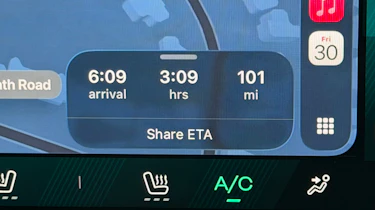
6. Share ETA
Rather than doing anything as old-fashioned as calling someone with an expected arrival time, you can easily share it through Maps by tapping ‘Share ETA’ on the route card. You’ll need to make sure the feature is turned on in Settings>Apps>Maps.
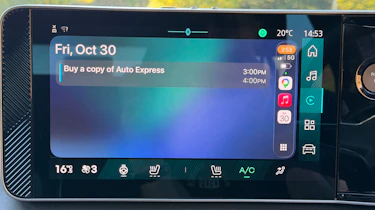
7. Calendar
To combat that sinking feeling of having forgotten something you should be doing, CarPlay has a calendar app which will show upcoming events, and where applicable, it’s possible to have the system give directions to whatever it is you might have forgotten about. If you prefer to keep your life organised with Google Calendar, that’s fine, even though it’s not compatible with CarPlay - you can simply set Apple Calendar to automatically pull in whatever’s on your Google Calendar.
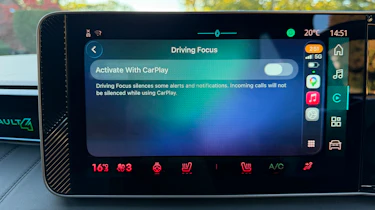
8. Driving Focus mode
Whether you don’t like distractions or simply want to switch off from the outside world for a bit, Driving Focus mode is worth a look. Activated in the settings menu, it mutes incoming messages but can automatically reply to let the sender know you’re driving, and not just being a bit rude. By replying with ‘urgent’, this can be overridden.
9. Video playback
It's a new feature for iOS 27, so this is one you might have missed. You can now play videos on your infotainment screen from supported apps, including YouTube and Netflix, via CarPlay. The car does, of course, need to be stationary for this to work. Video playback will switch to audio only the moment you set off.
10. Automations
Through the CarPlay section of your iPhone’s Shortcuts app, you can prompt numerous actions to occur when the device either connects or disconnects. It can speak a custom message, open a particular app, or play music. For the latter, you can choose from specific playlists, channels, and even songs. You can go even further if you have Apple Home-enabled devices. You could, for instance, programme a smart light to come on when your phone knows you’re near home.
Get even more from Auto Express, follow our channels...
• Google
• Reddit
• Whatsapp